Lead Sheet modeBeta
Audio & MP3 to Chords
Upload a song or paste a link. Ivory finds every chord and lays it on a timeline that plays with the recording, each chord with its Roman numeral, its role in the key and the keys to play it.
- Free preview of every song
- Audio files up to 10 minutes, or a link
- Made for full songs, vocals and all

Working out the chords of a song by ear is a skill worth having, and a slow one: replaying the same four seconds, trying a chord, rewinding, losing the thread at the bridge. Ivory does the first pass for you. It listens to the whole recording, vocals and drums included, and writes the harmony down beat by beat.
The result is not a list of chord names floating over the audio. Every chord sits on the song's beat grid, in bars, in the key Ivory detected, so you can read the progression the way musicians think about it: I, IV, V, the turn to the relative minor, the borrowed chord in the bridge.
What you get
A chord timeline that plays with the song
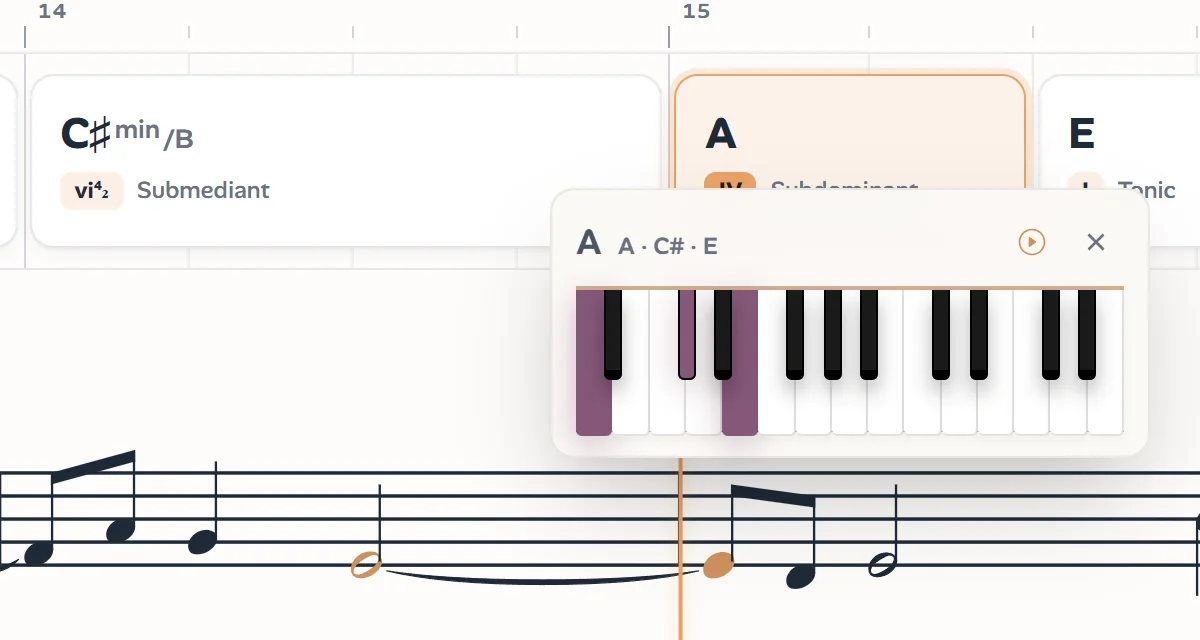
Each chord is a card on the beat grid, as long as it lasts. Press play and the chord that is sounding lights up, with the melody scrolling underneath.
Roman numerals and functions
Every chord is analysed in the song's key: its numeral (I, vi, V⁷), its inversion and its role (tonic, subdominant, dominant). A progression becomes a pattern you learn once and recognize everywhere.
The keys of every chord
Click a chord to see it on a piano keyboard and hear it, for the moments when a symbol like C♯m⁷/G♯ means nothing to your fingers yet.
Transpose and slow down
Move the song up or down by up to an octave: the chords, the staff and the playback follow. Slow it to a quarter of its speed, or play it twice as fast.
The melody, too
The chords come with the tune they carry: the melody on a staff under them, with a second line and the bass line when Ivory hears them.
Print or export the chart
Print a PDF, open the MusicXML in MuseScore, Sibelius, Finale or Dorico with every chord symbol in place, or take the MIDI into your DAW.
How to find the chords of a song
Four steps, and the hard part is Ivory's:
Upload the song or paste a link
An MP3, M4A, WAV or most audio and video files up to 10 minutes, or a YouTube, TikTok or Instagram link. A full mix is what Ivory expects: it listens for the harmony, not for one isolated instrument.
Ivory hears the beats, the bars and the key
It tracks every beat, finds where each bar starts, names the chord on each beat and works out the key the song is in. The beats and the chords come from the same model, so every chord change lands on a beat.
Read the progression as it plays
Open the song in the Dynamic view: the chords on a timeline above the melody, the sounding chord highlighted. Click any chord to see its keys, transpose the song or slow it down.
Print or export
Switch to the Classic view for a lead sheet with the chord symbols above the melody, then print it or export PDF, MusicXML or MIDI.
How accurate are the chords?
We measure our models on real songs they never saw in training, their chords labelled by hand. On those songs:
Measured on real songs kept out of training, October 2026.
Read that honestly: roughly one beat in twelve still carries a wrong chord. The mistakes are rarely random, and these are the usual ones:
- A chord a fifth away (G where the song plays C), when the bass sits on the fifth or the chord is only implied.
- A major chord and its relative minor confused (C and Am share two of their three notes), mostly when the third is not played.
- Changes a beat early or late in fast progressions, and short passing chords merged into their neighbours.
- A bare melody or an a cappella intro marked as no chord (N.C.): with almost nothing to go on, Ivory prefers no chord to a guess.
- Dense jazz voicings simplified: an altered dominant is written as a plain seventh chord.
These figures come from a small set of songs (six so far), so take them as a ballpark: a clean studio mix will usually do better than a live recording in a noisy room. And since every chord plays in time with the audio, a doubtful one takes a second to check.
Which chords can Ivory recognize?
Twelve roots and nineteen chord types, each with or without a bass note of its own (slash chords such as D/F♯):
major, minor, 7, maj7, m7, 6, m6, add9, 9, maj9, m9, sus2, sus4, 7sus4, dim, dim7, m7♭5, aug and m(maj7)
Larger chords are written as the nearest of these (a 13th chord as a 9th, an altered dominant as a 7th), and passages without harmony are marked N.C.
Why chord recognition is hard, from the people who build it
A chord is rarely played as a chord. A guitarist strums it, a pianist spreads it across both hands and four beats, a string section holds two of its notes while the singer supplies the third. In a full mix those notes share the spectrum with drums, voices and reverb, and the bass note that decides between C and Am can be a dull thump under the kick drum.
The hardest cases taught us the most. In an arpeggio with nothing underneath, only the bass sounds on the beat and the rest of the chord arrives one note at a time after it, so the model has to listen across the beat rather than at it. Our chord model learns from songs we labelled by hand, beat by beat, and from hundreds of songs we compose and render ourselves in many styles, where every chord is known exactly and the hard patterns are written in on purpose.
Ivory also predicts the beats and the chords together, on one grid. A chord change that falls between two beats is almost always a timing error rather than a musical fact, so tying the harmony to the beat removes a whole class of mistakes, and you get the chords already in bars, ready to read.
Who uses audio to chords?
Anyone who plays songs rather than scores:
- Guitarists, pianists and ukulele players learning songs by ear, who want the progression before they work on the voicings.
- Singers who need a chord chart for an accompanist.
- Cover bands and worship teams preparing a setlist, with charts in the key they actually perform in.
- Teachers showing why a progression works, its numerals on screen while it plays.
- Songwriters studying the harmony of songs they love, or putting their own demo on paper.
Chords, lead sheet or piano sheet music?
The chords are half of a lead sheet, which also writes the melody on a staff with the chord symbols above it: if you want the tune too, see Audio to Lead Sheet. If the recording is solo piano and you want every note of both hands, Ivory's piano mode writes full sheet music: see Audio to Sheet Music. And to name a single chord from its notes, there is the free Chord Finder.
Frequently asked questions
Every song starts with a free preview: Ivory transcribes it and shows you the first 8 bars. One credit unlocks the whole song, and a subscription includes 100 songs a month. Credits never expire.
MP3, M4A, WAV and most audio and video files, up to 10 minutes long, or a link to a YouTube, TikTok or Instagram video.
Yes. The chords come from Ivory's Lead Sheet mode, which is built for full songs: vocals, band, guitar or piano. Very sparse passages, like an a cappella intro, may come out as no chord.
Yes. Ivory works out the key and analyses every chord in it, with its Roman numeral and its function. Transpose the song and the chords move with it while the analysis stays the same.
Not yet. Chords are written as symbols, and clicking one shows its notes on a piano keyboard. The symbols themselves work on any instrument.
Yes, once the song is unlocked: a PDF lead sheet, MusicXML with the chord symbols for MuseScore, Sibelius, Finale or Dorico, and MIDI.
Usually a few minutes, depending on the length of the song and the queue. You can leave the page while it runs: the song waits for you in your library.
Find the chords of your next song
Upload a recording or paste a link, and read its harmony bar by bar a few minutes later.