Lead Sheet modeBeta
Audio & MP3 to Lead Sheet
Ivory listens to a song and writes its lead sheet: the melody on one staff, the chord symbols above it, in bars and in the right key. Play it back, transpose it, print it.
- Free preview of every song
- Audio files up to 10 minutes, or a link
- Made for full songs, vocals and all

What is a lead sheet?
A lead sheet is the shortest complete description of a song: the melody written on a single staff, the chord symbols above it, and the lyrics when there are any. It is what jazz musicians read from in a fake book, what a session player is handed at a gig and what a songwriter sends to a co-writer. The band reads the chords, the singer or the soloist reads the tune, and everyone fills in the rest.
Ivory writes the first two from a recording: the melody and the harmony, on the song's own beat grid, with its key and its meter. The lyrics are not transcribed.
What you get
An engraved lead sheet
The melody on one staff with the chord symbols above it, the key signature, the time signature and the tempo, laid out in pages like a printed chart.
Every line on a timeline
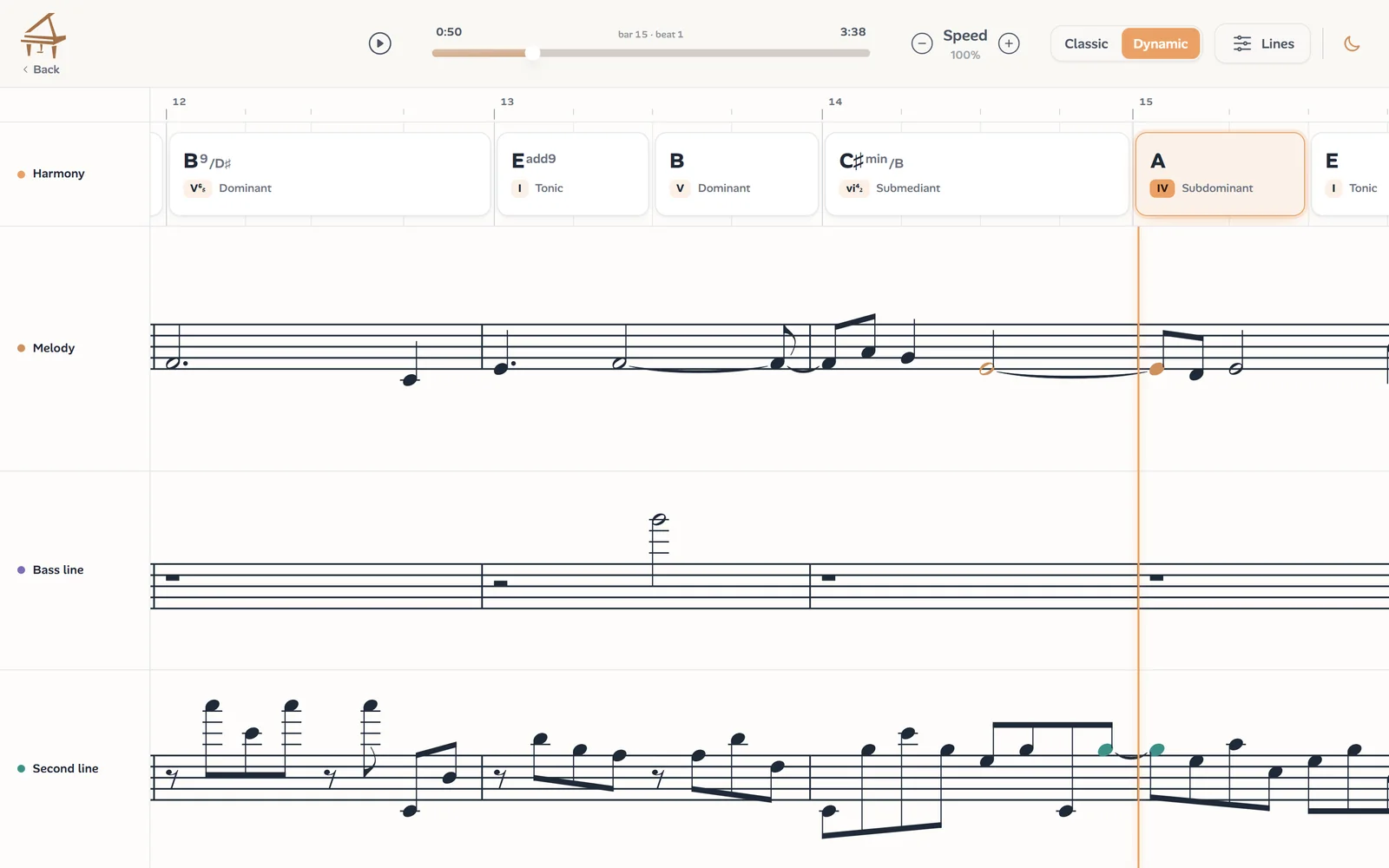
The Dynamic view lays the chords, the melody, a second line and the bass line on one timeline that scrolls with the song, the sounding notes lit up.
Hear what is written
Play the lead sheet back, the melody over its chords, mute any line, and slow it down to learn a phrase.
In the key you need
Transpose by up to an octave either way: the staff, the chord symbols and the playback follow, so a singer or a horn player reads it in their key.
Chords you can read
Each chord is analysed in the key, with its Roman numeral and its function, and shows its notes on a keyboard when you click it.
PDF, MusicXML and MIDI
Print it, continue in MuseScore, Sibelius, Finale or Dorico with the chord symbols in place, or take it into your DAW as MIDI.
How to make a lead sheet from a song
Upload, wait a few minutes, read:
Upload the song or paste a link
An MP3, M4A, WAV or most audio and video files up to 10 minutes, or a YouTube, TikTok or Instagram link. Use the full song: the band is what tells Ivory where the beat and the harmony are.
Ivory finds the beat grid
It tracks every beat, finds where each bar starts and settles the meter, so the melody and the chords have bars to live in.
The melody and the chords are written down
One model follows the lead line through the mix, sung or played, and places it note by note on the grid; another names the chord on every beat. Ivory then chooses a key signature and spellings, ties notes across barlines and picks rhythms a musician can read.
Play, transpose, print
Check the lead sheet against the recording, change the key or the speed, then print it or export PDF, MusicXML or MIDI.
How accurate is it?
We measure our models on real songs kept out of training, their melodies and chords labelled by hand. On those songs:
Measured on real songs kept out of training, October 2026.
In practice the shape of the tune and the harmony are there, and you will touch up details. The usual misses:
- Melody notes buried under a loud chorus, or doubled by another instrument, can be dropped.
- Fast runs and ornaments are simplified or partly missed.
- When a voice and a lead instrument trade phrases, Ivory follows the line it hears as the melody, which is not always the one you want.
- Free, rubato passages can push notes onto a neighbouring beat.
- In the chords: a chord a fifth away or its relative minor, and an a cappella intro left without chords.
These figures come from a small set of songs (six so far), so read them as a ballpark. Lead sheets are in beta: we retrain the models regularly and measure every new version on the same songs.
Why a lead sheet from audio is hard
A lead sheet looks simple, and that is the trap. The melody has to be pulled out of a full mix, where the voice shares its frequencies with guitars, keys and cymbals and the same notes are often doubled an octave away. Then it has to be written down, which means deciding what to leave out: a singer slides, scoops and anticipates the beat, and a lead sheet has to turn all of that into rhythms a musician can sight-read.
So we built it as one pipeline. Ivory tracks the beats and the bars first, then places the melody and the chords on that grid together, so a note and the chord under it always agree on where the beat is. The models learn from songs we labelled by hand, note by note and beat by beat, and the chord model also from hundreds of songs we compose and render ourselves, in many styles, where every chord is known exactly.
A lead sheet also has to stay readable. Ivory writes one melody line on one staff, chooses a key signature and spellings for it, ties notes across barlines instead of breaking them into fragments, and marks a swing feel once at the top instead of writing dotted rhythms everywhere.
Who makes lead sheets from recordings?
Lead sheets are the working paper of popular music:
- Singers who need a chart for an accompanist or a session, in their own key.
- Jazz and pop musicians learning a tune and its changes from a record.
- Bands and worship teams sharing one chart per song before rehearsal.
- Teachers preparing a melody with its chords for students to read and play.
- Songwriters putting a demo on paper for a co-writer, an arranger or a publisher.
Lead sheet or full piano sheet music?
A lead sheet gives you the tune and the harmony and leaves the arrangement to you. If you only need the progression, see Audio to Chords. If your recording is solo piano and you want both hands written out note for note, use Audio to Sheet Music: Ivory's piano mode is built for exactly that.
Frequently asked questions
Every song starts with a free preview: Ivory transcribes it and shows you the first 8 bars. One credit unlocks the whole song, and a subscription includes 100 songs a month. Credits never expire.
MP3, M4A, WAV and most audio and video files, up to 10 minutes long, or a link to a YouTube, TikTok or Instagram video.
Yes, that is what it is for: the melody is usually the lead vocal, and Ivory follows it through the band. Instrumental songs work too, with a lead instrument as the melody.
No. Ivory writes the melody and the chords; the lyrics are not transcribed.
Not inside Ivory yet: the score editor does not open lead sheets for now. Export the MusicXML to edit it in MuseScore, Sibelius, Finale or Dorico, chord symbols included.
Yes, by semitones, up to an octave either way: the staff, the chord symbols and the playback follow. For a B♭ trumpet or clarinet, raise it two semitones.
Classic is the lead sheet as pages, the way you print it. Dynamic is a timeline under the chords that scrolls with the recording and shows every line Ivory heard (the melody, a second line, the bass line), each of which you can mute.
Usually a few minutes, depending on the length of the song and the queue. You can leave the page while it runs: the song waits for you in your library.
Put your song on paper
Upload a recording or paste a link, and get its melody and chords as a lead sheet you can play, transpose and print.