Question
Is there an app that listens to a song and writes the notes?
Yes. Here is what such an app can write down, for a piano piece and for a song, and how far you can trust it.
The short answer
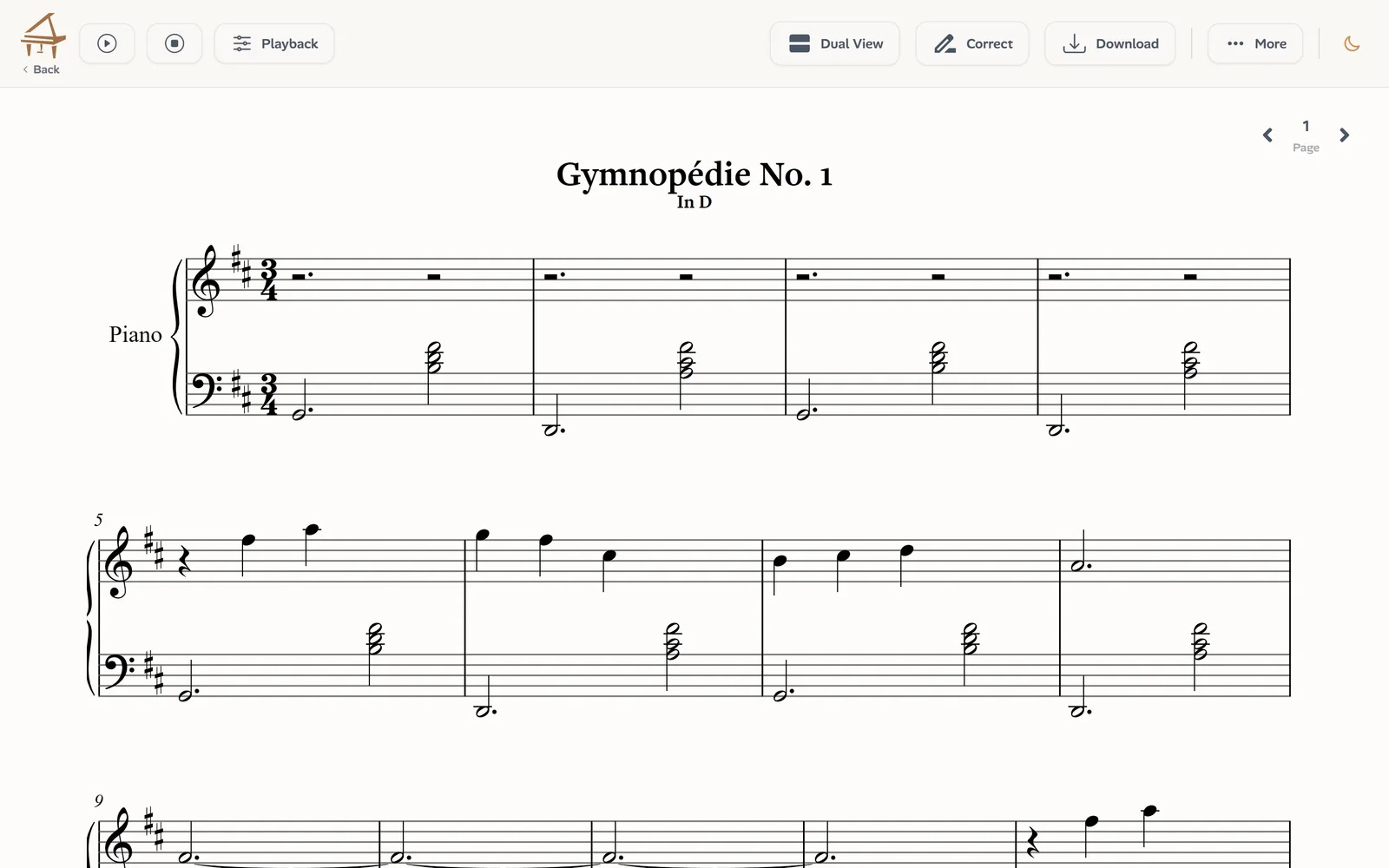
Yes. Music transcription apps listen to a recording and write down what was played. Ivory is one of them: it turns a piano recording into a full score and a MIDI file, and a song with vocals into a lead sheet, the melody with its chords. You upload a file or paste a link, and a few minutes later you can read the result, hear it and download it.
Two things decide what you get: the kind of music, and what you mean by the notes.
What “the notes” can mean
People asking for the notes of a piece usually want one of three things, and each takes a different kind of transcription:
- Every note of a piano part, both hands, to play the piece as it was recorded. That is Ivory’s Piano mode, for a piano playing alone.
- The melody, the line someone sings, to play it on any instrument.
- The chords, to accompany the song on the piano or the guitar.
For a song with a singer or a band, the melody and the chords together make a lead sheet, and that is what Ivory’s Lead Sheet mode (in beta) writes. Writing every note of a whole band as a piano score would give a page nobody could play.
How it works
First the app turns the sound into notes: their pitch, when each one starts, how long it lasts and how loud it is. Ivory’s piano model was trained on solo piano recordings only; for songs, separate models find the melody, the beat and the chords in the full mix.
Then the notes are written as music: a tempo and a meter, every note placed on the beat, a key signature, and for a piano piece two staves, one per hand. That second step matters as much as the first. A list of correct pitches is not yet something a musician can read.
How to get the notes of a recording
With Ivory, in four steps:
Choose what it is
A piano recording, or a song with vocals or a band.
Upload it or paste a link
An MP3, M4A, WAV or most audio and video files up to 10 minutes, or a YouTube, TikTok or Instagram link to a video under 15 minutes.
Wait a few minutes
The transcription runs on Ivory’s servers, and the song waits for you in your library.
Read, play, download
Read the score or the lead sheet, hear it played back, watch it as falling notes, and download a PDF, MusicXML or MIDI.
How accurate is it?
On a clean recording of a piano alone, most notes and rhythms come out right. Fast passages under a lot of sustain pedal, very dense chords and noisy recordings need corrections, which you make in Ivory’s editor before you export.
The Lead Sheet mode is younger and in beta. On real songs kept out of training, 8 in 10 of the melody notes it writes are right, it finds 2 in 3 of the melody’s notes, and the chord is right for 92% of the song’s duration, at the level of major and minor. Those figures come from six songs, so read them as a ballpark.
What it does not write
Even when the notes are right, some things are not part of the transcription:
- Lyrics: Ivory writes notes and chords, not the words.
- Drums and percussion.
- A band’s separate parts: a song gives a lead sheet (its melody, chords, a second line and a bass line), not a part for each instrument.
- Guitar tablature: chords come as chord symbols.
Only what you may use
Being able to transcribe a recording does not give you the right to use it. Transcribe your own playing, music in the public domain, or recordings whose owner allows it. Publishing or selling a transcription of someone else’s song usually needs the permission of whoever holds its rights.
And by ear?
Working out notes by ear is still worth learning, and many musicians do both: the app for a first draft, the ear to check it. Ivory’s player helps with the second part: slow the music down, loop a passage, and hide one hand to hear the other.
More on each mode: AI piano transcription for piano recordings, audio to lead sheet for songs, and YouTube to sheet music for videos.
Frequently asked questions
Without a credit, every transcription is a free preview: the first 30 seconds as falling notes and the first 8 bars of the score. The whole song and its downloads take one credit: a single credit costs €3.99 and never expires, and a subscription (€8.99 a month) includes 100 songs a month.
Yes. Paste the link of a YouTube, TikTok or Instagram video under 15 minutes, and Ivory transcribes its sound. Only use videos you are allowed to use.
Yes. The score carries a key signature, a meter and a tempo.
Yes, in the browser, and there is an Ivory app for iPhone and iPad.
Choose Song instead of Piano recording: the Lead Sheet mode (in beta) writes the melody and the chords. Piano mode is for a piano playing alone.
A piano score, yes: it opens in Ivory’s editor, where you can move, add or delete notes, change a note’s hand and fix the rhythm. A lead sheet is exported as MusicXML to edit in notation software.
Find the notes of your recording
Choose piano or song, upload a file or paste a link, and read the first 8 bars for free.
Get the sheet music