Piano mode
Turn a piano recording into MIDI
Upload a recording or paste a link. Ivory writes down every note of both hands and gives you a MIDI file for your DAW, your notation software or your practice.
- Made for solo piano
- Free preview of every song
- Audio files up to 10 minutes, or a link

What a piano MIDI file holds
A MIDI file holds no sound. It is a list of instructions: which key goes down, when, for how long, and how hard. Played through a piano sound or opened in notation software, that list becomes the music again, and every note in it can be changed.
Converting a piano recording to MIDI means writing that list from the audio alone. A good file keeps the two hands apart, keeps the touch of each note and keeps the timing of the performance, so it still sounds like a person playing when you press play.
What you get
Two hands, two tracks
The right hand and the left hand are separate tracks: mute one, give each its own sound, or practise them apart.
Real velocities
Each note keeps how hard it was played, from the softest touch to the loudest chord, instead of one flat level.
The pedal, if you want it
One switch lengthens the notes the sustain pedal held, so the file rings the way the recording does.
Performance or score MIDI
Take the notes exactly as they were played, or take them from the score, on the beat, at the tempo you choose.
Fix it before you download
A wrong note, or a note in the wrong hand: correct it in Ivory, then download the corrected file.
The score comes with it
The same transcription is engraved as a piano score: print it as a PDF, or open the MusicXML in MuseScore, Sibelius, Finale or Dorico.
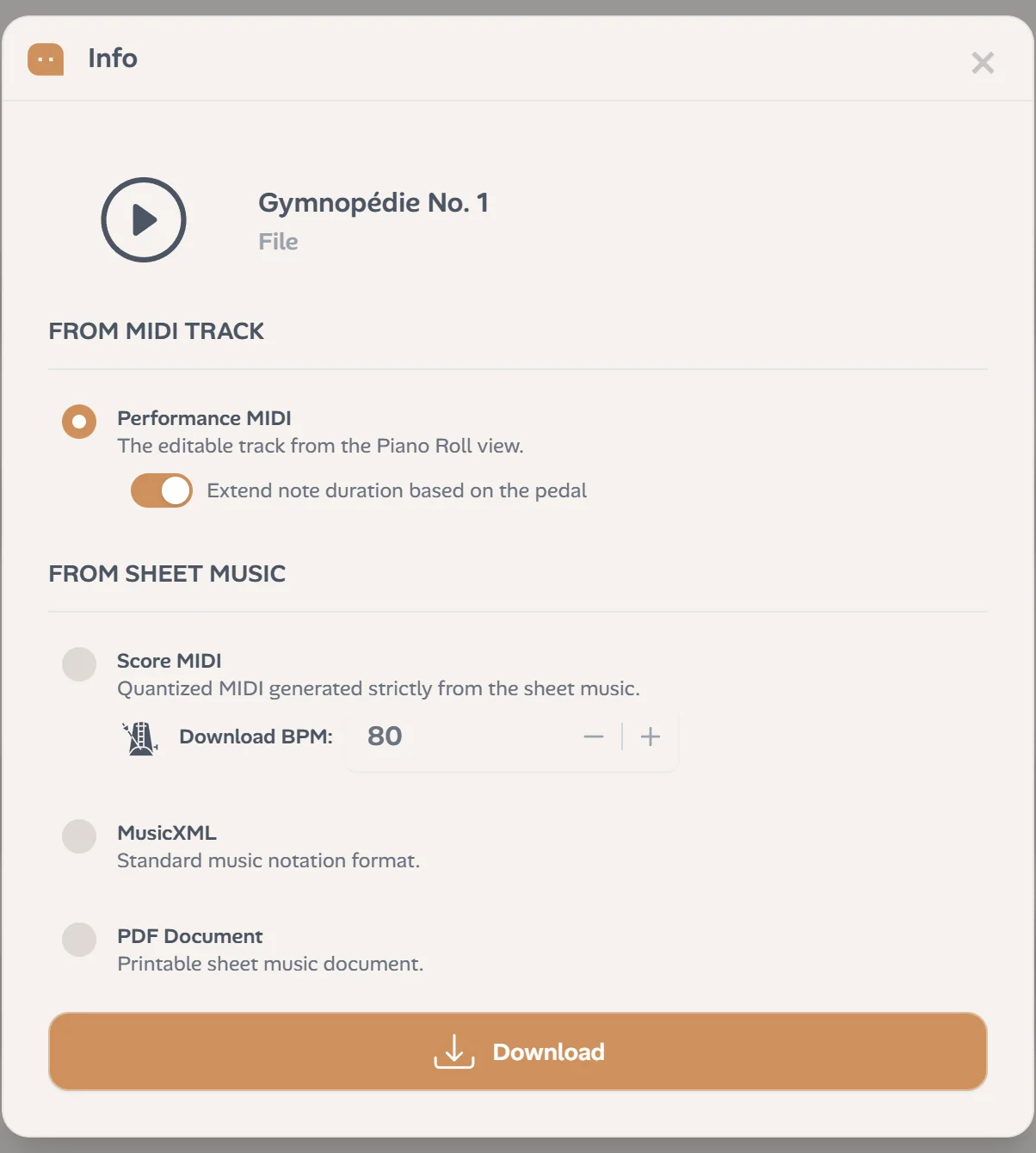
Performance MIDI or score MIDI?
One recording gives you two MIDI files, because they do two different jobs.
Performance MIDI
Every note where it was played, with its own length and velocity, rubato included. It sounds like the recording. Keep it to preserve a performance, to drop a real piano part into a song, or to watch it as falling notes.
Score MIDI
The notes of the score Ivory engraves from the recording, each one on the beat, at the tempo you type in the download window. It lines up with the bars of a DAW. Use it to arrange, to add other instruments, or to import into notation software.
MP3 to MIDI, WAV to MIDI, video to MIDI
Whatever holds the recording, the conversion is the same. Ivory accepts MP3, M4A, WAV and most audio and video files up to 10 minutes and 30 MB, and links to YouTube, TikTok and Instagram videos under 15 minutes. No special microphone and no MIDI keyboard: a phone recording of an acoustic piano works.
Already have a MIDI file? Upload it the same way to watch it as falling notes and get its score.
How to convert a piano recording to MIDI
Three steps, a few minutes:
Upload or paste a link
A file from your computer or your phone, or the link to a video. The piano alone gives the best result.
Ivory writes down the notes
A model trained on solo piano finds every note: its pitch, its start, its length and its velocity, with the pedal, and gives each note to a hand.
Check, then download
Play the result as falling notes or as a score, fix what needs fixing, then download the performance MIDI or the score MIDI.
Why piano is the hardest instrument to convert
Most audio to MIDI converters were made for one note at a time: a voice, a flute, a bass line. A pianist plays ten notes at once, both hands crossing the same octaves, while the sustain pedal keeps one chord ringing under the next. In the audio, those notes are not separate things you can pick out: their harmonics land on top of each other.
That is why we built Ivory for solo piano only. Our model learned what a piano sounds like, note by note and pedal by pedal, and nothing else. Dense chords, fast runs and repeated notes are where general converters struggle, and where we spend most of our time.
It is not perfect. A fast passage under heavy pedal can lose a note or merge two, and a noisy recording loses its quietest notes first. That is why every result opens in an editor, and why every song starts with a free preview.
Who converts piano to MIDI, and what for
A MIDI file is where many projects start:
- Producers put a real piano performance into a song in Logic Pro, Ableton Live, FL Studio or GarageBand, then change its sound or tighten its timing.
- Composers and songwriters keep an improvisation or a voice memo as notes, before it is forgotten.
- Teachers turn a recording into exercises and practice material.
- Pianists learn a piece from a performance, slowed down, one hand at a time.
Built for solo piano, on purpose
Piano mode expects a piano alone: a grand, an upright or a digital piano, at home or on stage. With a singer, drums or a band, it hears notes that are not there. For a full song, use the Lead Sheet mode (in beta): it writes down the melody and the chords. For the score of a piano recording, see audio to sheet music.
Frequently asked questions
Without a credit, every transcription is a free preview: the first 30 seconds as falling notes and the first 8 bars of the score, so you can check the result. One credit transcribes the whole song and unlocks its downloads: a subscription (€8.99 a month) includes 100 songs a month, and a single credit costs €3.99 and never expires.
Yes. The right hand and the left hand are two tracks of the file. Ivory decides which hand plays each note, and if it gets one wrong, you can move that note to the other hand in the editor.
Velocity, yes: every note keeps how hard it was played. The pedal shapes the note lengths instead: in the download window, the pedal switch lengthens the notes the pedal held. The file has no separate pedal events.
Yes: paste its link instead of uploading a file. Ivory uses the sound of the video, so it works best when the piano is alone and clear. Videos must be under 15 minutes, and only use recordings you have the right to use.
MP3, M4A, WAV and most audio and video files, up to 10 minutes and 30 MB, or a link to a video under 15 minutes.
Yes. The editor lets you correct wrong notes, hands and rhythms, and the player has an edit mode for the performance. Your downloads include your corrections.
Piano mode is for solo piano, and other instruments give poor results. For a full song, use the Lead Sheet mode (in beta), which writes the melody and the chords instead.
Convert your first piano recording
Upload a recording or paste a link. Check the start for free: the first 30 seconds as falling notes, the first 8 bars as a score.