Falling notes player
Turn a recording into a piano tutorial
Upload a recording or paste a link. Ivory transcribes it and plays it back as falling notes, with 3D hands showing the fingering. Slow it down, loop the hard bars, and learn one hand at a time.
- Free preview of every song
- 3D hands with finger numbers
- Plays in your browser

A tutorial made from the recording itself
Falling notes tutorials are usually made by hand: someone learns the piece, plays it into a MIDI keyboard and films the screen. Ivory makes one from the recording: it transcribes what was played, then plays it back as notes falling onto a keyboard, each hand in its own colour, at the speed you choose.
Because the notes come from the transcription, your own recordings can become tutorials: a passage your teacher played for you, a piece you are working on, or your own playing that you want to check.
Made for practising
3D hands and fingering
Two hands play every note on the keyboard, with a finger number on each one. Change a finger and the notes around it follow.
Slow it down
Lower the speed 10% at a time until your fingers know the way, then bring it back up.
Loop the hard bars
Drag over the notes to pick a passage, and it repeats until you have it.
One hand at a time
Hide the left or the right hand: its notes disappear and fall silent, so you play that part while Ivory plays the other.
Transpose
Move the whole piece up or down a semitone at a time, into a key that suits you.
The score, one click away
Switch to the sheet music of the same transcription and read along.
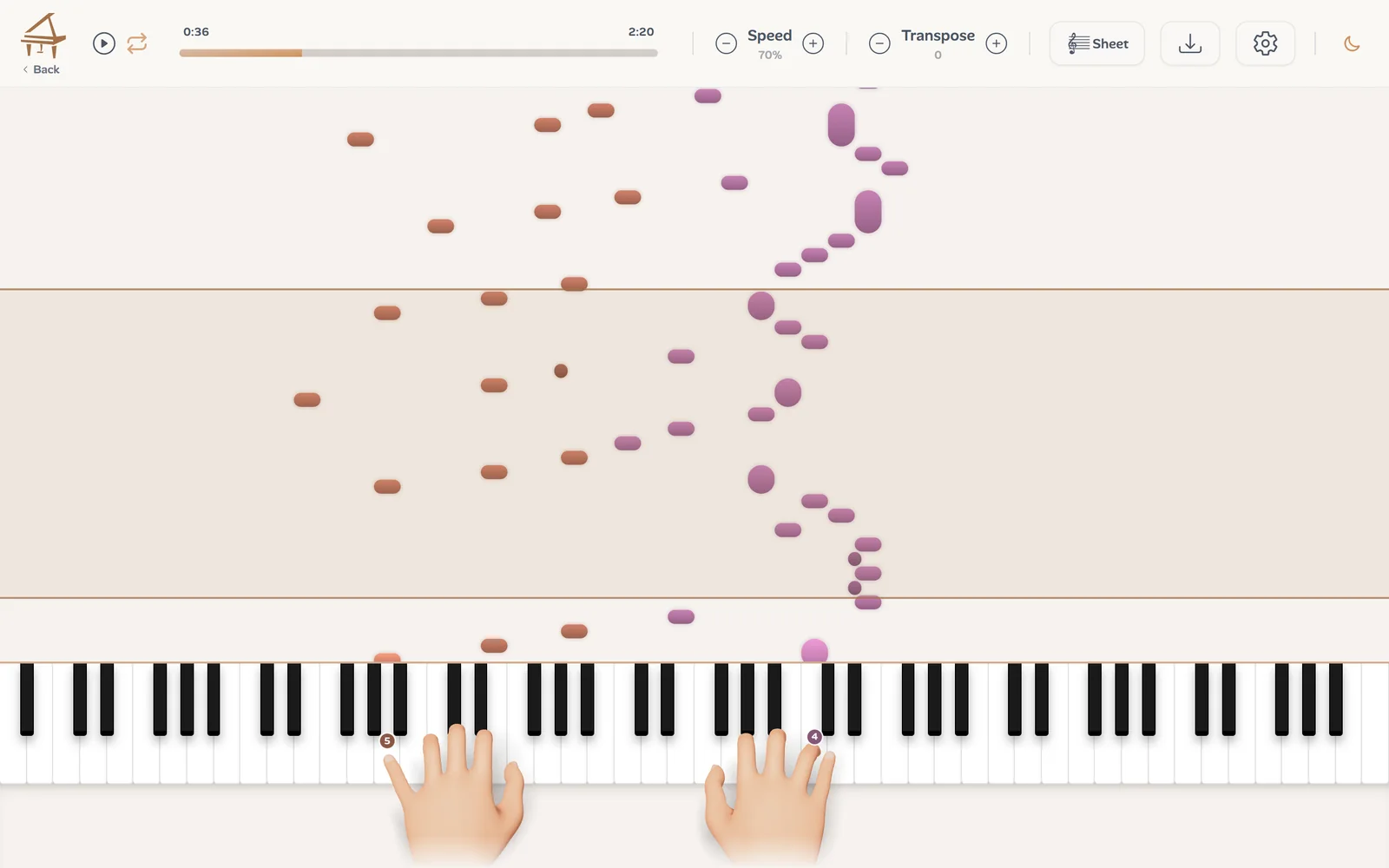
How to make a piano tutorial from a recording
Three steps:
Upload or paste a link
A recording up to 10 minutes, or a YouTube, TikTok or Instagram link to a video under 15 minutes.
Ivory transcribes it
A few minutes later, the song is in your library, with its notes, its hands and its score.
Press play
Open it in the player: falling notes, hands, speed, loop. The first 30 seconds of every song are free.
Songs fall as coloured lines
Not every song is piano music. A song with a singer goes through the Lead Sheet mode (in beta), and the player then shows its chords, its melody and, when the song has them, a second line and a bass line, each in its own colour, with a legend at the top left. Click a line to hide it: a hidden line is muted too, so you can play it while the others play along.
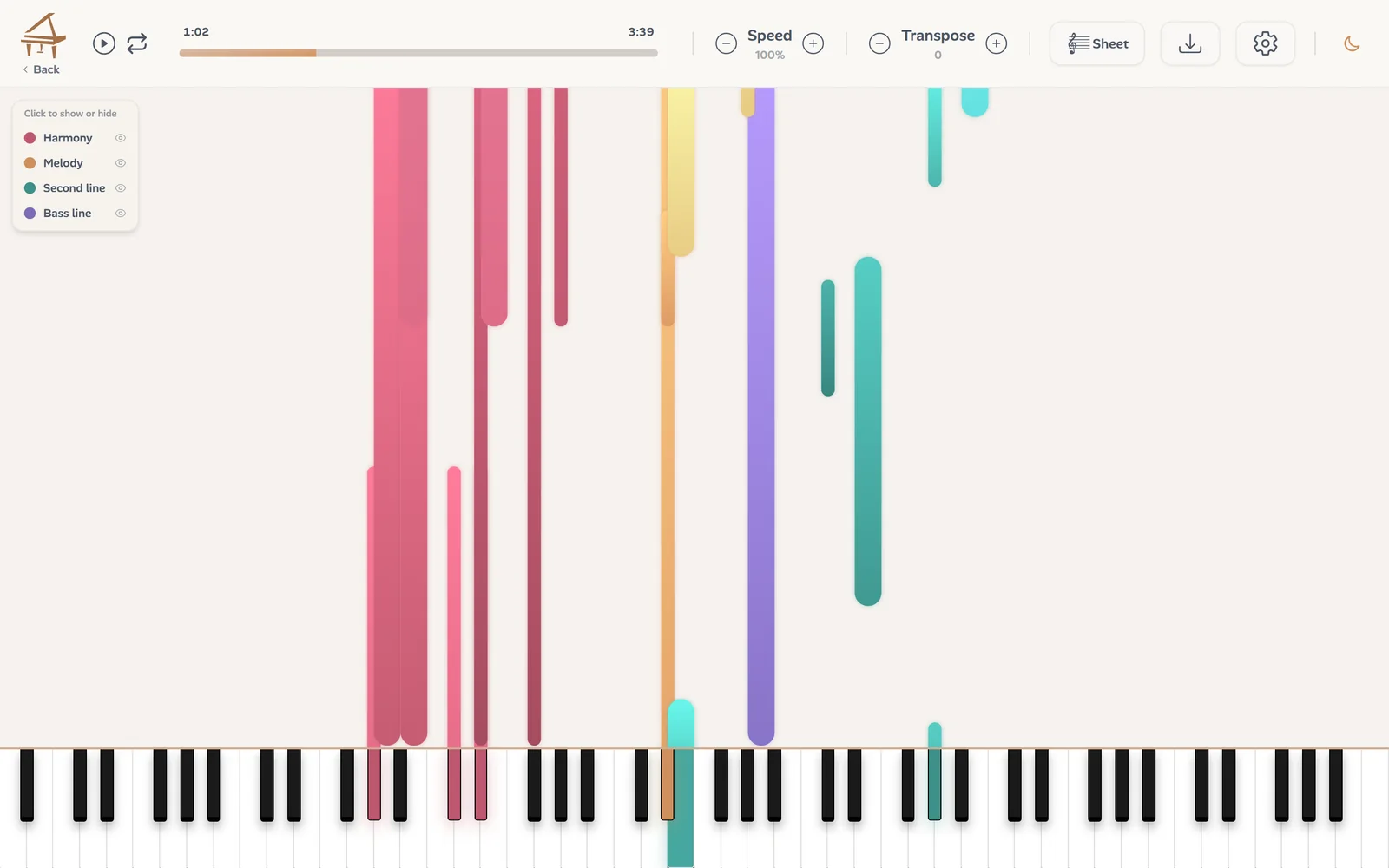
A lead sheet has no hands: its lines are not the two hands of one pianist.
How Ivory chooses the fingers
Fingering is what a falling notes video cannot show, and what decides whether a passage is playable. Ivory gives every note a finger, from 1 for the thumb to 5 for the little finger, by looking at the notes around it: how far apart they are, which keys are black, and where the hand has to be next. The aim is a hand that moves as little as possible.
It is a suggestion, not a rule. Small hands, a teacher's habits, two editions that disagree: in finger editing you can change any number, your choice is saved with the song, and the notes around it are refingered to match.
Want a video instead?
To post a tutorial rather than practise with it, Ivory's video maker for iPhone and iPad turns the transcription into a falling notes video, with animated themes, your own hand colours and the score under the notes.
Frequently asked questions
No. Ivory makes the tutorial from a recording or a link, and you play along on any piano or keyboard.
Without a credit, every transcription is a free preview: its first 30 seconds in the player, hands included. One credit transcribes the whole song and unlocks its downloads: a subscription (€8.99 a month) includes 100 songs a month, and a single credit costs €3.99 and never expires.
From the notes around each one: the stretch between them, which keys are black, and where the hand goes next, so the hand moves as little as possible. You can change any finger, and your choice is saved with the song.
Yes. The player plays the notes themselves, not the recording, so the speed changes and the pitch stays where it is. Loop a passage by dragging over its notes.
Yes, in the browser. On a phone the 3D hands start switched off: turn them on in the player settings. There is also an app for iPhone and iPad.
Yes, through the Lead Sheet mode (in beta): the player shows its melody, chords and bass as coloured lines you can hide one by one.
Make your first tutorial
Upload a recording or paste a link, and play the first 30 seconds for free.