Piano mode
AI piano transcription, from your recording to the score
Ivory listens to a piano recording and writes down what was played: every note, both hands, the rhythm and the key. It engraves the score, and you check it against the recording.
- Made for solo piano
- Free preview of every song
- Audio files up to 10 minutes, or a link

What the AI writes down
Transcribing piano means answering a few questions about every sound in the recording: which keys went down, when, for how long, how hard, and with which hand. Ivory answers them for the whole piece, then turns the answers into a score a pianist can read.
- Every note: its pitch, start, length and loudness, even inside dense chords.
- The hands: each note goes to the right or the left hand, on the treble or the bass staff.
- The rhythm: a tempo and a meter, with each note placed on the beat, as a score needs it.
- The key: a key signature, and a sharp or a flat for every black key.
- The pedal: notes held by the sustain pedal keep their length in the MIDI file.
How it works
A few minutes, four steps:
Upload a recording
A phone recording, an MP3 or WAV file up to 10 minutes, or a YouTube, TikTok or Instagram link to a video under 15 minutes.
The AI finds the notes
A model trained only on solo piano detects every note, how hard it was played, and the pedal.
Notes become a score
Ivory fits a tempo and a meter to the performance, puts the notes on the beat, splits them between the hands, picks a key signature and engraves the score.
You check it
Play the score against the recording, fix what is wrong in the editor, then download a PDF, MusicXML or MIDI.
Check it against the recording
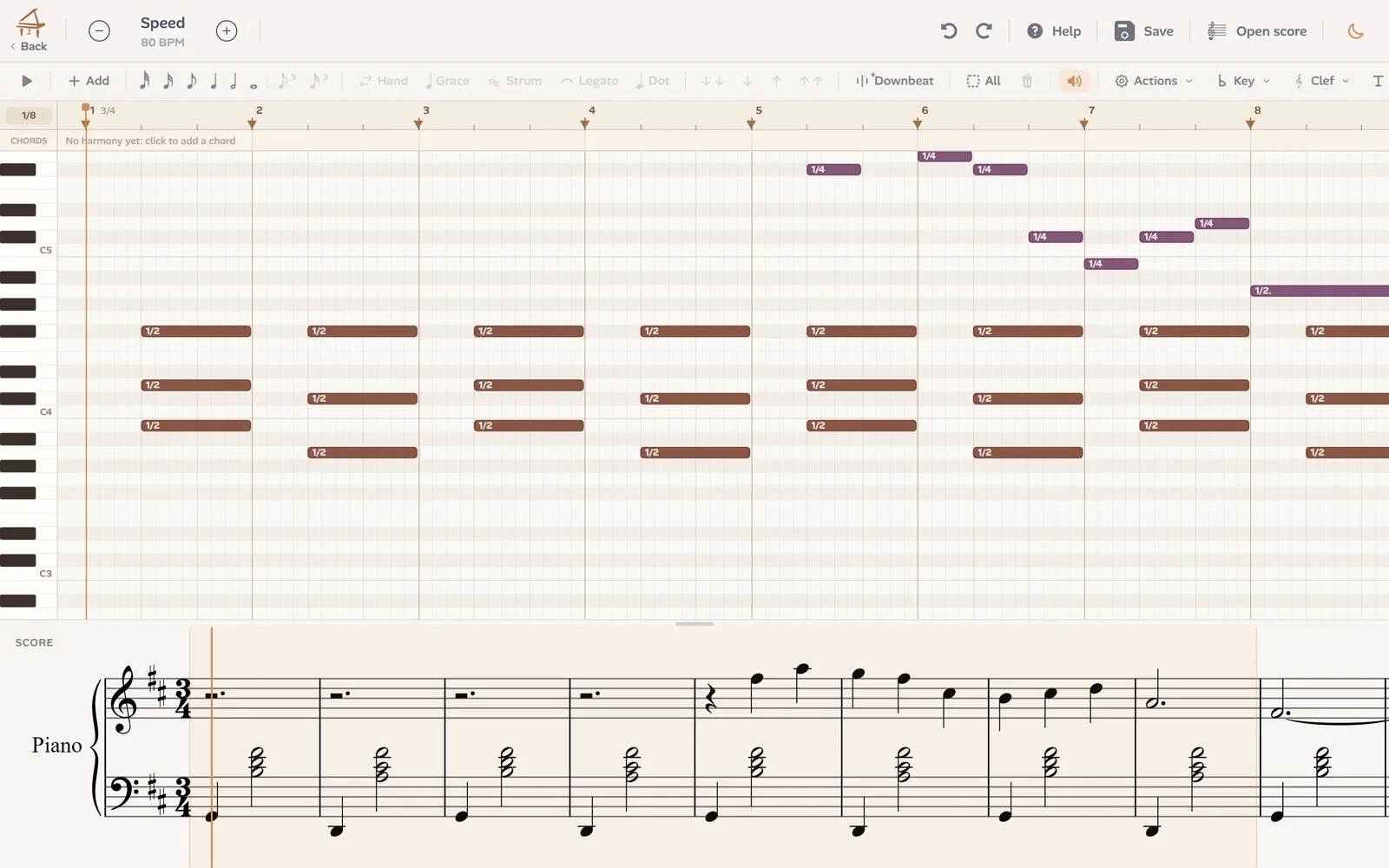
No transcription is right the first time, whether a person or a machine wrote it. What matters is how fast you find and fix the mistakes. In Ivory the score plays back beside the recording, and the editor shows the notes above the score they make: move a note, change its length or its hand, and the score below is redrawn.
The player shows the same transcription as falling notes, with two hands playing it, so you can hear and see where it differs from what was played.
AI or a human transcriber?
A good human transcriber still wins on some music: a heavily pedalled impressionist texture, a jazz voicing whose inner notes blur, a rubato so free that no meter fits it. They also make an editor's choices, such as how to beam a passage so it reads well, or which notes a player can leave out.
What the AI changes is the time and the cost. A human transcription takes days and is paid by the piece or by the page. Ivory takes minutes, and every song starts with a free preview, so you can judge the result on your own recording before you decide. For many pieces, a few minutes in the editor turn it into a clean score.
Which recordings transcribe best
The clearer the piano, the better the score. What helps most:
- Record close to the piano: a phone on the music stand beats a phone across the room.
- Keep the room quiet: voices and background noise can turn into wrong notes.
- Record the piano alone: a singer or a second instrument confuses Piano mode.
- Play a piano in tune: a badly out-of-tune instrument can give wrong pitches.
- A digital piano is ideal, and a video is fine as long as its sound is not heavily compressed.
For solo piano. Songs have their own mode
Piano mode is made for a piano alone. For a song with a singer or a band, the Lead Sheet mode (in beta) writes the melody and the chords instead, and audio to chords finds the chords of a song.
Frequently asked questions
It depends on the recording and on the music. On a clean solo piano recording, most notes and rhythms come out right; fast passages under heavy pedal, very dense chords and noisy recordings need more corrections. The free preview lets you judge on your own recording first.
Without a credit, every transcription is a free preview: the first 8 bars of the score and the first 30 seconds as falling notes. One credit transcribes the whole song and unlocks its downloads: a subscription (€8.99 a month) includes 100 songs a month, and a single credit costs €3.99 and never expires.
Yes. Every note goes to one hand, on the treble or the bass staff, and each hand is its own track in the MIDI file. If a note lands in the wrong hand, move it in the editor.
Yes. The model hears the pedal, and when you download the performance MIDI, a switch keeps the notes as long as the pedal held them.
Yes, in Ivory's editor, and you can export MusicXML at any time to continue in MuseScore, Sibelius, Finale or Dorico.
Both. Ivory works in the browser on any computer, and there is an app for iPhone and iPad.
Not in Piano mode. For a full song, the Lead Sheet mode (in beta) writes the melody and the chords.
Transcribe your first recording
Upload a piano recording or paste a link, and check the first 8 bars of its score for free.