How to promote your piano music online
A practical guide to promoting your own piano music on TikTok, Instagram Reels, YouTube and Spotify: record, show the notes, share the sheet music, and keep going.
Promoting your piano music is less about one viral video than about a habit: posting regularly, putting your music where people already are, and making it easy for a listener to become a player of what you post.
None of it needs a label, a studio or a budget. It needs your own music, a piano, a phone and some patience. Here are the steps, in the order most pianists meet them.
Post piano music regularly
A two-minute piece that is out is worth more than a long one that is almost ready. Short pieces are easier to finish, easier to record in one take, and easier for a stranger to listen to all the way through.
Pick a rhythm you can hold for a year, such as one piece every two weeks, and keep it. Each post is another chance to be found, and a channel with twenty pieces tells a new listener that there is more to come.
Record your piano with good sound
You do not need a studio, but for the listener the recording is the piece. A few things matter more than the equipment:
- Tune the piano, or use a good digital one: an out-of-tune instrument is the first thing people hear.
- Put the phone or the microphone close to the piano, in a quiet room.
- Record the whole piece in one take when you can: it sounds like music, not like editing.
- Keep it solo piano if you plan to make a video or a score from the recording: the notes are found more accurately.
Make piano videos people watch: falling notes
Piano music spreads on video. A still picture over the audio gives nobody a reason to stay. Falling notes do: the viewer sees each note coming before hearing it, so there is always a reason to watch until it lands.
You can film your hands, but that takes a camera stand, good light and editing. The other way is to let the recording draw the video. Ivory's video maker does this on iPhone and iPad, in four steps:
Play or import
Record your piano with your iPhone, import an audio file, or paste a link to a performance of yours.
Ivory finds the notes
It transcribes the recording into the notes of both hands and engraves the matching sheet music.
Choose the look
Pick a theme, a colour for each hand and a background that matches your channel, add the title of the piece as an intro, and set the reverb of the piano sound.
Export and post
Save the video to Photos or share it straight to another app. It is vertical, 1080 by 1920, the format of TikTok, Reels and Shorts.
The app is free to download. Without a subscription, the videos carry a small translucent Ivory watermark, which subscribers can turn off.
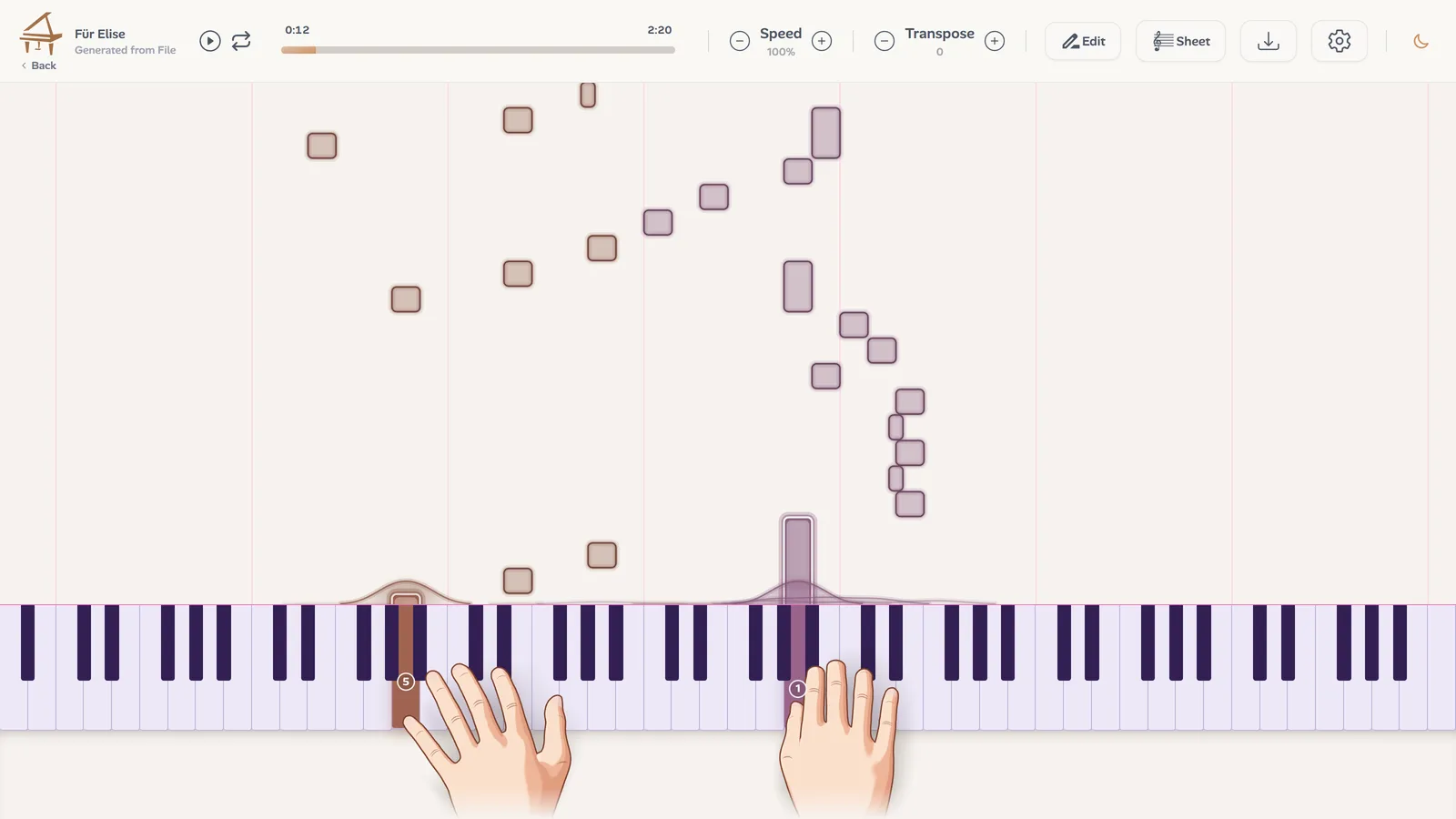
Choose your piano video format
The same performance can be exported in three layouts. Choose by what you want the viewer to do:
- Falling notes alone: the most eye-catching, for a first meeting with a new piece.
- Notes and score: the sheet music under the falling notes, with a playhead that follows your playing. For people who want to learn the piece.
- Big score: the notation fills more than half the frame, large enough to read on a phone. For pianists who read.
Get more views with the first seconds
Open on the part people will remember, the main motif or the moment the left hand comes in, rather than on a slow introduction. If the melody is the hook, turn the title intro off so the first notes land at once.
A whole piece rarely fits a short video, and it does not have to. Post the best passage, and say where the full version is.
Share your piano sheet music
Music spreads when other pianists play it. People who like one of your pieces ask for the sheet music, play it, film themselves and name you. Each of them shows your music to people you would never have reached.
If you compose or improvise at the keyboard and never wrote the music down, the recording is enough: Ivory's piano transcription writes it as a two-staff score. Correct what it misheard in the editor, then export a PDF for players, MusicXML for notation software, or MIDI.
Promote your piano music on Spotify and YouTube
Short videos are where people meet your music. Streaming and longer videos are where they come back to it. A digital distributor puts your recordings on Spotify, Apple Music and the other streaming services, and a YouTube video of the whole piece gives your short clips somewhere to send people.
Solo piano is often played while people work, read or fall asleep, so calm pieces find their way into playlists. Give each release a clear title and a cover, and group your pieces into playlists of your own.
Help people find your piano channel
People cannot follow a composer they cannot name. Small habits help a lot:
- Use the same artist name and the same picture everywhere.
- Write the title of the piece and the words original piano piece in every caption and in your hashtags: people search for music with words.
- Keep one link in your profile, leading to the full pieces and the scores.
- Invite other pianists to play your pieces, and ask them to name you when they post one.
Grow your audience as a pianist
Answer comments, especially the first ones. Say how a piece came about, what it is for, which bar gave you trouble: listeners follow people as much as pieces.
Play in real rooms too. A school, a café with a piano, a local concert series or an open stage puts your music in front of people who will remember your face, and gives you something to film.
A weekly routine to promote your piano music
Put together, a week can look like this:
- Write or finish one short piece, or one passage of a longer one.
- Record it, and make a falling notes video of its best passage.
- Post the video with the title, your name and where to hear the rest.
- Add the sheet music to your catalogue once the piece is finished.
- Reply to the people who wrote to you.
It is slow at first, and it adds up: every piece you publish keeps working for the ones before it.
Frequently asked questions
Post short videos of your best passages on TikTok, Instagram Reels and YouTube Shorts, name the piece in the caption, share the sheet music and answer the people who comment. None of it costs money. It takes regular work.
Open on the strongest part of the piece, show the notes so there is a reason to keep watching, keep the sound clean, and write the title of the piece in the caption and the hashtags.
Yes. Ivory works from audio: record an acoustic or a digital piano with your iPhone, or import a recording. No MIDI keyboard is needed.
The app is free to download. Videos exported without a subscription carry a small translucent Ivory watermark, and subscribers can turn it off.
The video export is in Ivory's app for iPhone and iPad, on iOS 16 or later. On the web, Ivory shows your piece as falling notes in the browser and writes its score.
No. Ivory writes the score from a recording of your playing, and you can correct notes in the editor before exporting. It still helps to have someone who reads look it over.
Turn your next piece into a piano video
Record your piano with your iPhone and export a falling notes video, with its score if you like.
See the video maker