Convert an MP3 to MIDI
Upload an MP3 and get a MIDI file of its notes. Ivory is really powerful at piano, both hands on their own tracks with real velocities, and it converts whole songs too.
- Free preview of every song
- Audio files up to 10 minutes, or a link
- YouTube, TikTok and Instagram links

What an MP3 to MIDI converter does
An MP3 holds sound. A MIDI file holds no sound at all: it is a list of notes, each with its pitch, its start, its length and how hard it was played. Converting an MP3 to MIDI means listening to the recording and writing that list, so that a DAW, a notation app or a digital piano can play it back, change its sound or print it.
The hard part is the music itself. One instrument playing one note at a time is easy to follow. A piano playing ten notes at once, or a band with a singer, is not: notes hide inside chords, the pedal blurs them, and every instrument sounds at the same time. That is what Ivory was built for.
What you get
Piano: two hands, two tracks
From a piano MP3, the right hand and the left hand are separate tracks: mute one, or give each its own sound.
Real velocities
Each note keeps how hard it was played, from the softest touch to the loudest chord, instead of one flat level.
Songs: the lines of the music
From a song, Song mode writes the melody, the harmony and the bass line, and the MIDI holds the notes of that score.
Performance or score MIDI
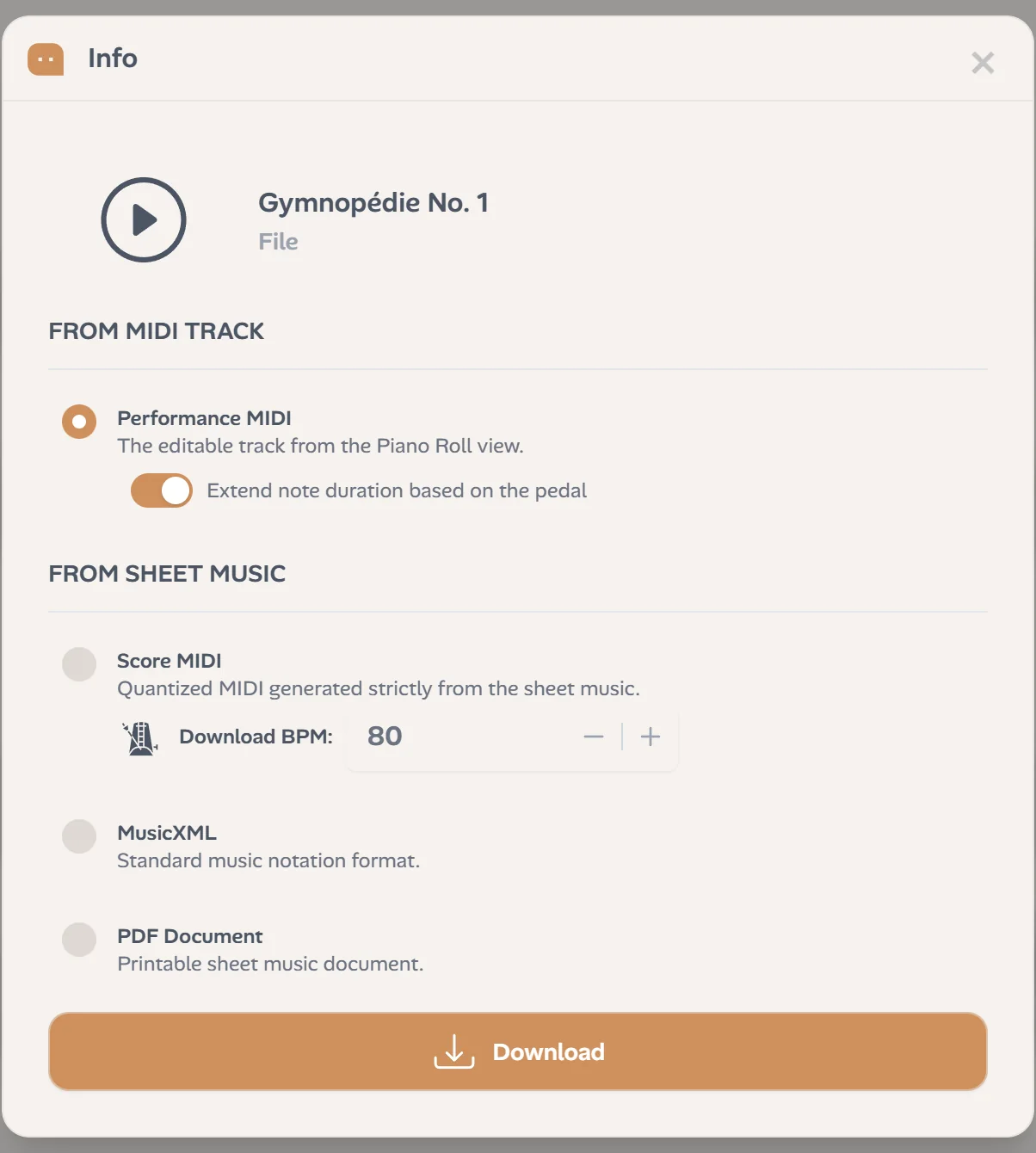
Take the notes exactly as they were played, or take them from the score, on the beat, at the tempo you choose.
Fix it before you download
A wrong note, or a note in the wrong hand: correct it in Ivory, then download the corrected file.
Sheet music comes with it
The same transcription is a score too: print it as a PDF, or open the MusicXML in MuseScore, Sibelius, Finale or Dorico.
How to convert an MP3 to MIDI
Three steps, a few minutes:
Upload the MP3
From your computer or your phone. WAV, M4A, FLAC and video files work the same way, and so do YouTube, TikTok or Instagram links.
Choose piano or song
Piano solo for a piano playing alone, Song for vocals, a band or several instruments. Ivory writes down the notes in a few minutes.
Check, then download
Play the result as falling notes or as a score, fix what needs fixing, then download the performance MIDI or the score MIDI.
MP3 to MIDI for piano
Piano is where Ivory is strongest. Its piano model follows fast runs, dense chords and passages held by the pedal, gives every note to the right or the left hand, and keeps each note's velocity. The performance MIDI sounds like the recording, rubato and all; switch the pedal on and the notes ring the way they did.
More on piano to MIDI, or read the score on AI piano transcription.
MP3 to MIDI for songs
A song is many instruments at once, so a single list of every note would be a blur. Choose Song mode and Ivory separates what matters: the melody, the harmony as it is played and the bass line, on the beat, with the chord symbols. The MIDI file holds those notes, ready for a DAW or a notation app.
See song to sheet music for the score of a song.
Which files work
MP3, WAV, M4A, FLAC and most audio and video files up to 10 minutes and 30 MB, or a link to a video under 15 minutes. A clear recording gives the best MIDI: the instrument close to the microphone, little reverb, no talking over the music.
Frequently asked questions
Every conversion starts with a free preview: the first 30 seconds as falling notes and the first 8 bars of the score, so you can check the result. A credit (€4.99 for 5 minutes, never expires) or a subscription (€8.99 a month) converts the whole recording and unlocks the MIDI download.
Yes, with Song mode: you get the MIDI of the melody, the harmony and the bass line. For a piano playing alone, choose Piano solo to get every note of both hands.
In Piano mode, yes: the right hand and the left hand are two tracks. If a note lands in the wrong hand, you can move it before downloading.
Velocity, yes: every note keeps how hard it was played. The pedal shapes the note lengths: in the download window, the pedal switch lengthens the notes it held.
Yes. WAV, M4A, FLAC and most audio and video files work like an MP3, up to 10 minutes, and so do YouTube, TikTok and Instagram links.
Yes. It is a standard MIDI file for Logic Pro, Ableton Live, FL Studio, Cubase, GarageBand or any notation app.
Convert your first MP3
Upload a recording, say whether it is piano or a song, and check the start for free.