Piano to sheet music, from any recording
Upload a piano recording or paste a video link. Ivory writes it down as sheet music, both hands on the grand staff, ready to read, print and play.
- Free preview of every song
- Made for solo piano
- YouTube, TikTok and Instagram links

From piano sound to a score
A recording tells you how a piece sounds. Sheet music tells you how to play it: which notes, in which hand, on which beat. Converting piano to sheet music means writing that down from the sound alone, the way a transcriber would by ear, only in minutes.
Ivory does it in two stages. Its piano model finds every note in the recording, even inside chords and under the pedal. Then the score is built from those notes: a tempo and a meter, bar lines, a key signature, and each note on the treble or the bass staff.
What you get
Both hands on the grand staff
The right hand on the treble staff and the left hand on the bass staff, as in any printed piano score.
Bars, beats and key
A time signature, bar lines and a key signature, with every note placed on the beat.
Print it as a PDF
Download the engraved score as a PDF and put it on the music stand.
MusicXML and MIDI too
Open the score in MuseScore, Sibelius, Finale or Dorico, or take the MIDI into your DAW.
Correct it in the browser
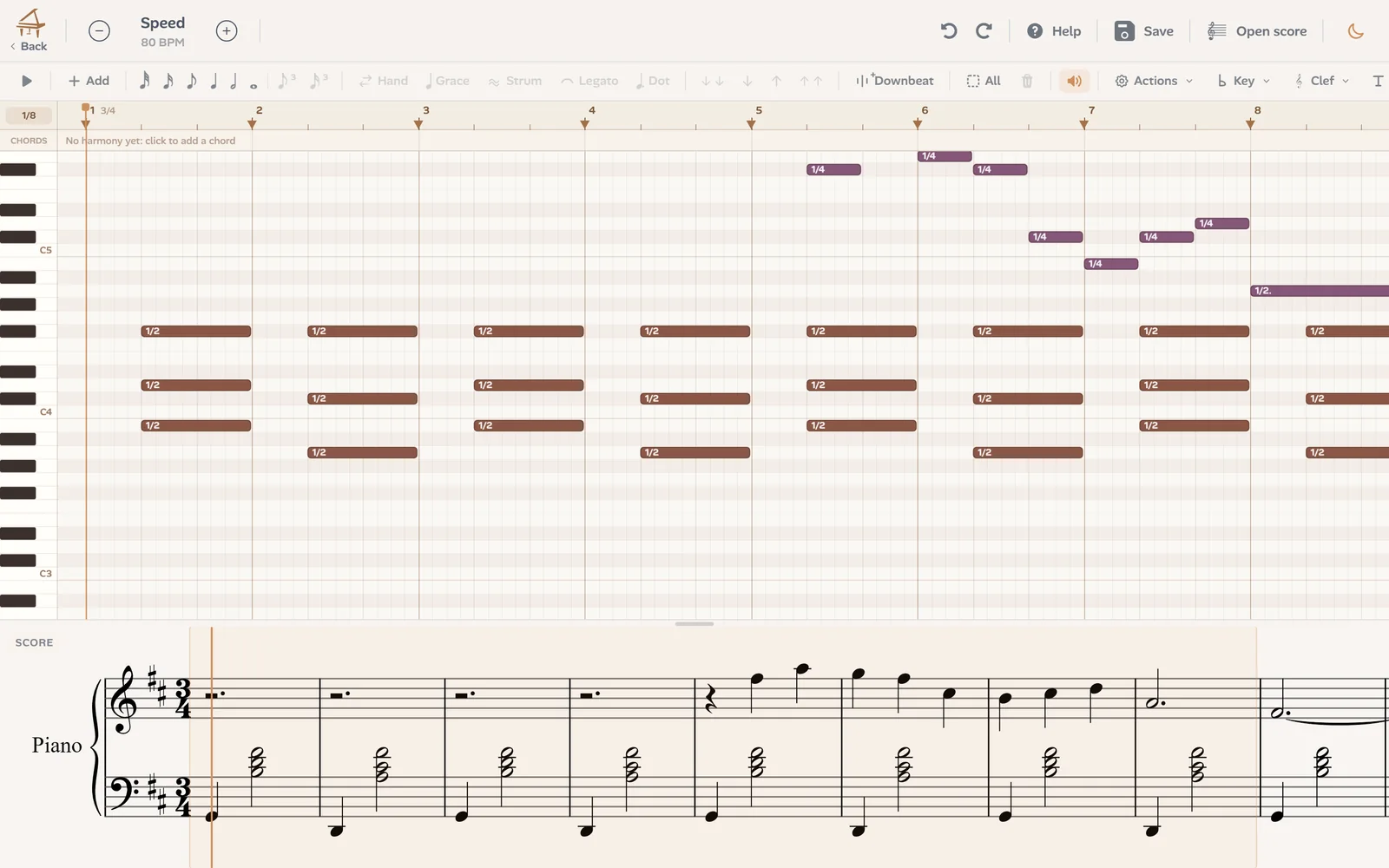
Move a note, change its length or its hand in the editor, and the score below is redrawn.
Learn it with falling notes
The same transcription plays as falling notes with 3D hands and finger numbers, slowed down or looped.
How to convert piano to sheet music
Three steps, a few minutes:
Add the recording
An MP3, WAV, M4A or video file up to 10 minutes, or a YouTube, TikTok or Instagram link to a video under 15 minutes. A phone recording is fine.
Ivory writes the score
The piano model finds the notes, the hands, the rhythm and the key, and engraves the sheet music.
Read, fix, download
Play the score against the recording, correct what needs it, then download the PDF, MusicXML or MIDI.
Check it against the recording
No transcription is perfect the first time. In Ivory the score plays back beside the recording, so you hear where it differs, and the editor shows the notes above the score they make.
For the cleanest score
The clearer the piano, the better the sheet music:
- Record close to the piano, with the phone on the music stand rather than across the room.
- Keep the room quiet: voices and noise can turn into wrong notes.
- Use a recording of the piano alone: a singer or a band confuses Piano mode.
- Play an instrument in tune: a badly out-of-tune piano can give wrong pitches.
A song rather than a piano piece?
Piano mode is made for a piano playing alone. For a song with vocals or a band, Song mode (in beta) writes a score of its melody with the chords and the bass line.
Frequently asked questions
Any recording of a piano playing alone, from a phone recording to a concert video. The clearer the piano, the cleaner the score: noise, reverb and other instruments add mistakes to correct. The free preview shows you the result on your own recording first.
Every recording gets a free preview: the first 8 bars of the score and the first 30 seconds as falling notes. A credit at €4.99 (5 minutes of transcription) unlocks a whole piece with its downloads, and a subscription at €8.99 a month includes 80 minutes a month.
Yes. Each note goes to the right or the left hand, on the treble or the bass staff. If a note lands in the wrong hand, move it in the editor.
Yes: paste its link instead of uploading a file. Videos must be under 15 minutes, and a video where the piano sounds alone and clear gives the best score.
PDF to print, MusicXML to continue in MuseScore, Sibelius, Finale or Dorico, and MIDI for a DAW or a digital piano.
Yes. Ivory works in the browser on any computer or phone, and there is an app for iPhone and iPad.
Turn your recording into sheet music
Upload a piano recording or paste a link, and read the first 8 bars of its score for free.